
How Trimble Connect Improves Project Collaboration Between Office and Site Teams
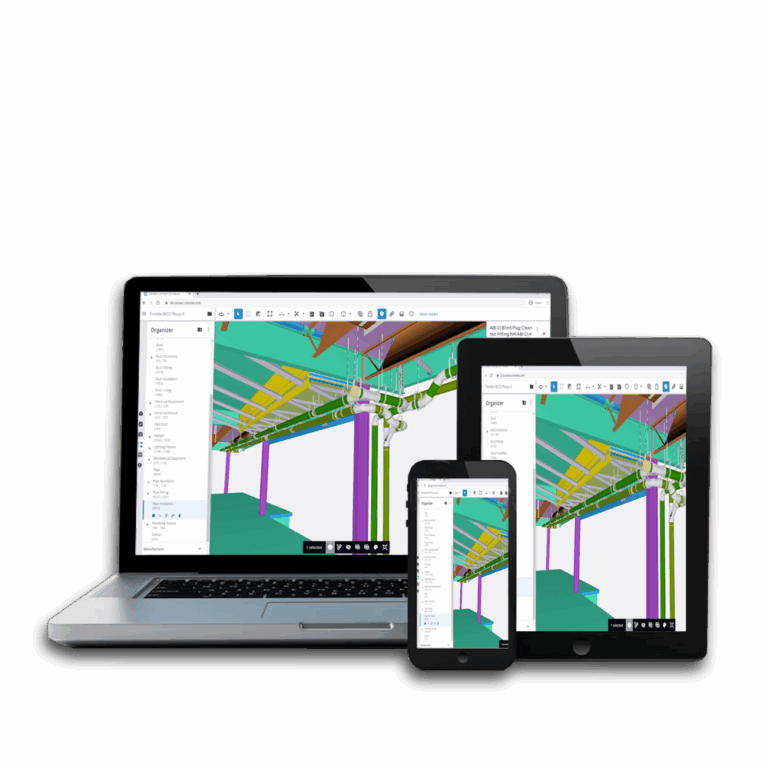
Connected construction extends beyond communication.
Collaboration links coordinated project information with its practical use on site. Maintaining that connection as information moves between office and field workflows gives each team greater context for the decisions that follow.
Trimble Connect provides a shared environment that extends project data into site workflows while supporting ongoing coordination.
Project teams gain a clearer view of how changing requirements affect site activity and where they need further input.
1. Connecting Office and Site Teams With Trimble Connect

Office and site teams engage with project information from different perspectives. A connected workflow keeps information available in context as it moves between coordination and on-site activity.
Trimble Connect gives office and site teams access to project data through a shared cloud construction software environment across compatible devices.
Key elements of a shared project environment include:
- Centralised Project Information: Brings project data into a common environment for office and site teams.
- Cross-Device Access: Makes the shared environment available across compatible desktop and mobile devices.
- Shared Models and Drawings: Keeps key visual project information within the same collaborative environment.
- Connected Project Teams: Gives authorised project members access to the information shared through the platform.
2. Keeping Models and Project Information Current
A model revision can affect the wider construction workflow. Model collaboration gives teams a practical way to share and review updated models, drawings and associated data as designs and project requirements change.
Keeping revisions visible gives teams a consistent basis for coordination throughout the project.
Giving Site Teams Access to Project Data
On-site access to models and drawings connects project information directly with construction activity. Desktop, tablet and mobile devices make relevant information available where work is taking place, giving site teams the context to compare project data with site conditions and identify discrepancies.
Bringing Field Updates Back to the Office
Site activity generates information that can influence ongoing coordination. Field queries or changing conditions can return to the shared environment for office review and further input.
3. Managing Project Queries and Actions
Construction queries need a clear route from identification to resolution to keep coordination moving across teams.
Trimble Connect software keeps queries within the wider coordination workflow as teams assign actions and work towards resolution. A traceable record gives teams visibility of what requires attention and how each query progresses.
Tracking ToDos, RFIs and Responsibilities
Trimble Connect ToDos give teams a structured way to assign and track project actions, while Requests for Information (RFIs) provide a way to seek clarification. Assigning responsibility creates clear accountability as queries move through the coordination workflow.
Reviewing Issues in Model Context
Associating a query with the relevant model information gives teams spatial and design context for review. This clarifies its location and the affected element before teams determine the required action.
4. What an Office-to-Site Trimble Connect Workflow Can Look Like
The capabilities above come together when project information needs to move between office and site teams. For example, a model revision may trigger a site review, which in turn identifies a query requiring further input or action.
A typical two-way workflow could look like this:
| Stage | What Happens | Who Needs Visibility |
| Office Update | A model, drawing or other piece of project information changes. | Office/project team |
| Information Shared | Revised information becomes available through the shared project environment. | Relevant project members |
| Site Review | Site personnel access and review the information where work is taking place. | Site team |
| Query or Issue Identified | A matter requiring clarification or action is raised against the relevant project information. | Office and site teams |
| Responsibility Assigned | The required action is directed to the appropriate person. | Responsible team member |
| Response Returned | The resulting information or decision becomes available to the people who need it. | Wider project team |

5. When Trimble Connect Becomes Particularly Valuable
Trimble Connect can be particularly useful on projects where information changes frequently or needs to move between several participants. Regular model revisions, multiple stakeholders and ongoing site queries can make it harder to maintain visibility when information is spread across separate systems.
A shared platform gives teams a more structured way to manage these interactions. This becomes especially relevant when office and site teams work from different locations or when project decisions depend on timely feedback from the field.
When evaluating construction collaboration software, consider where delays or gaps currently occur in your own projects. If model updates, queries and actions are difficult to follow from one stage to the next, a connected platform can help create a clearer coordination process.

Explore Trimble Connect With BuildingPoint SA
Consider where information currently loses momentum between your office and site teams. A more connected approach creates a clearer path from model updates and site queries to the actions and decisions that follow.
Explore Trimble Connect or speak to a BuildingPoint SA collaboration specialist about improving how your team shares models, manages project information and coordinates work between office and site.